
How We Built PortfolioOS: A Full-Stack Architecture Deep Dive
Building a SaaS platform that turns a resume, LinkedIn profile, or GitHub account into a polished portfolio sounds simple. But under the hood, it's a carefully orchestrated pipeline spanning AI extraction, schema validation, auth, payments, and rendering. Here's the full architecture breakdown — from monorepo structure to deployment.
PortfolioOS is a Next.js 16 monorepo with four packages — a main app, a shared schema library, a React component library for rendering portfolios, and a Python-based PDF parser. It's powered by Supabase for auth and storage, Stripe for billing, and the Vercel AI SDK with OpenRouter for AI-powered data extraction and chat. Let's walk through each layer.
The Big Picture
Before diving into individual pieces, here's the system at a glance. The architecture is organized into three columns: data sources on the left, the core platform in the center, and rendering on the right. Infrastructure services sit beneath, powering everything.
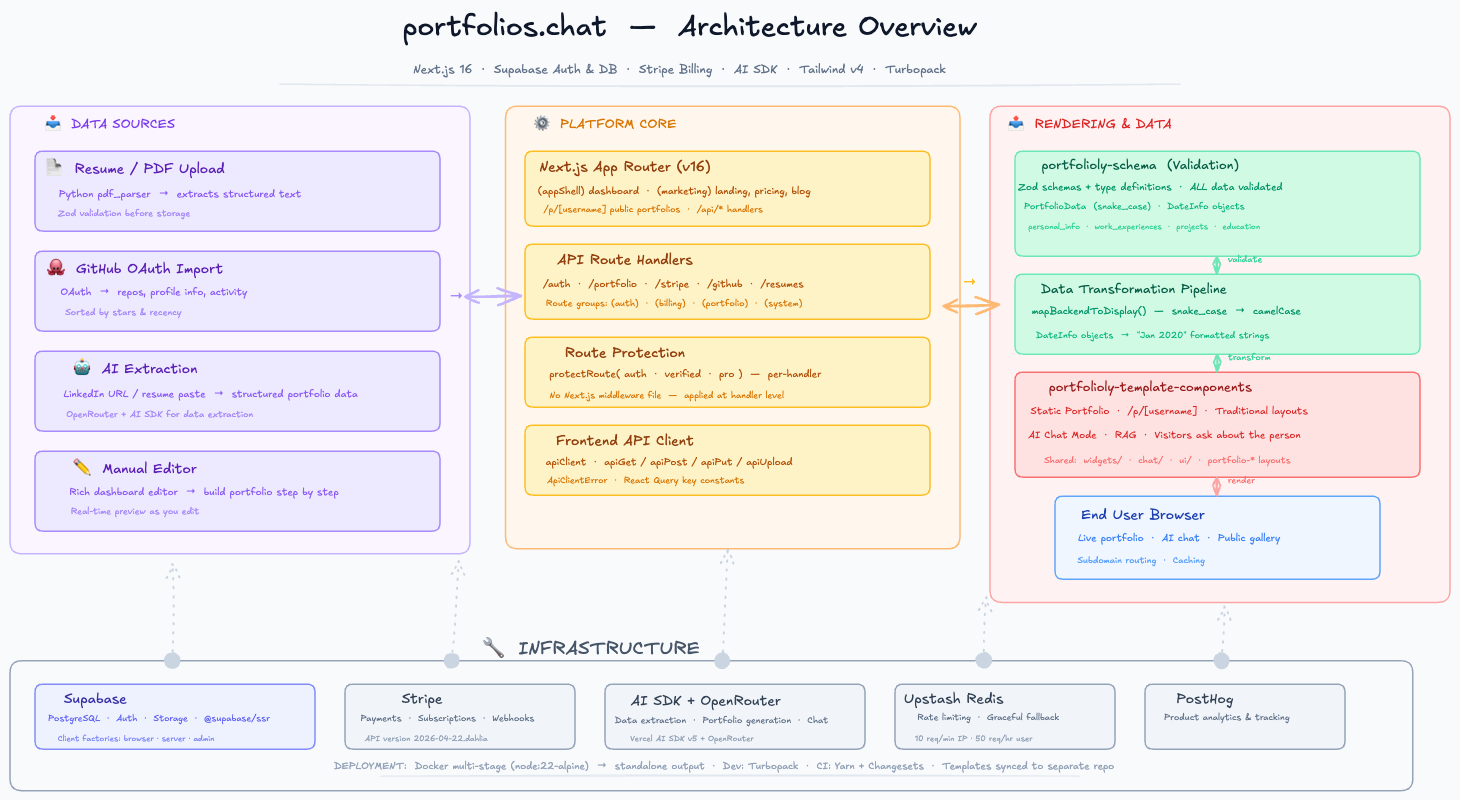
Click to expand — PortfolioOS architecture showing the data flow from ingestion through validation, storage, and rendering.
Monorepo Structure: Four Packages, One Source of Truth
We chose a pnpm workspace monorepo because the platform naturally splits into distinct concerns that need to share types. Four packages, each with a clear boundary:
- apps/main — The Next.js 16 App Router. Handles all routes, API endpoints, auth, billing, and the admin dashboard. This is the command center.
- packages/schema (published as
portfolioly-schema) — The single source of truth for all data shapes. Zod schemas, TypeScript types, and the criticalmapBackendToDisplay()transformer. Every other package depends on this. - packages/template-components (published as
portfolioly-template-components) — React components that render portfolio pages. Supports both static traditional layouts and an AI chat mode where visitors can ask questions about the portfolio owner. - packages/pdf_parser — A Python utility that extracts structured text from uploaded resumes. Runs as a command-line tool invoked by the main app.
The build order is enforced: schema → template-components → main. Both Turbopack (local dev) and Docker (production) respect this dependency chain.
Why a monorepo works here
Shared types eliminate drift between API responses and component props. When the schema package updates, the template-components package immediately knows about new fields. No version mismatch bugs. The workspace:* protocol means we're always developing against the latest local code.
Data Pipeline: The Backbone
The core innovation is the data pipeline. Portfolio data flows through five stages, each with a clear responsibility. Understanding this pipeline is understanding the entire platform.
Stage 1: Ingestion
Data can enter the system four ways. Each path feeds into the same validation pipeline, making the ingestion methods completely interchangeable:
- PDF upload — The Python parser extracts text from resumes, which the AI then structures into portfolio data.
- GitHub OAuth — We pull repos, profile info, and contribution activity. Repos are sorted by stars and recency.
- AI extraction — Paste a LinkedIn URL or resume text, and the AI SDK with OpenRouter models extracts structured work experiences, projects, education, and skills.
- Manual editor — A rich dashboard where users build portfolios step by step with real-time preview.
Stage 2: Validation
Every piece of data, regardless of source, passes through the same Zod schemas in portfolioly-schema. No data enters the database without passing validation. This is enforced at the API handler level — there's no way to skip it.
The schema package defines one canonical representation: PortfolioData. It uses snake_case keys, DateInfo objects for dates, and strongly typed enums for things like skill levels and project types. This representation is designed for the backend — it's what goes into Supabase.
Stage 3: Storage
Supabase handles three things: PostgreSQL for structured data (portfolios, users, subscriptions, tokens), Supabase Storage for binary assets (avatars, project images), and Supabase Auth for user sessions. We use three client factories — browser, server, and admin — each with appropriate permission levels managed in src/lib/supabase.ts.
Stage 4: Transformation
Here's where the architecture gets interesting. The backend representation (PortfolioData) is not what components render. We have a strict separation:
| Aspect | PortfolioData (backend) | DisplayPortfolioData (frontend) |
|---|---|---|
| Key style | personal_info | profile |
| Work history | work_experiences | experience |
| Dates | { month: 1, year: 2020 } | "Jan 2020" |
| Transform | mapBackendToDisplay() — called at the API client layer, never in components | |
The transformer runs in the API client (apiClient.ts) before data reaches any component. Components never deal with snake_case or DateInfo objects. This is enforced by convention and type checking — the template-components package only accepts DisplayPortfolioData.
Stage 5: Rendering
The template-components package consumes DisplayPortfolioData and renders it in two modes:
- Static portfolio — A traditional resume-style layout at
/p/[username]. Clean, professional, with sections for experience, projects, education, and skills. - AI chat mode — Visitors can ask questions about the portfolio owner. Uses RAG (retrieval-augmented generation) to provide accurate, context-aware answers. The portfolio data becomes a knowledge base.
Auth & Route Protection
We use Supabase Auth with a custom middleware pattern. There's no Next.js middleware.ts file — instead, route protection happens at the handler level via protectRoute():
- requireAuth — Checks the Supabase session cookie. Returns 401 if missing.
- requireVerification — Checks
email_confirmed_at. Returns 403 if unverified. - requirePro — Checks the subscription plan and status. Returns 402 if not paid. Supports
proandlitetiers.
This pattern is cleaner than Next.js middleware because it keeps auth logic co-located with the routes it protects. No global regex matching against path patterns. Each handler declares what it needs.
Client-side auth
On the client, useAuth() from AuthContext.tsx provides session state, loading status, and auth actions. The context uses @supabase/ssr for server-side rendering compatibility.
Infrastructure That Scales
Five external services power the platform. Each was chosen for a specific reason:
- Supabase — Combines PostgreSQL, auth, and storage in one platform. Row-level security enforces data access at the database level. Three client factories (browser, server, admin) prevent accidental privilege escalation.
- Stripe — Handles payments and subscriptions. We use the latest API version (2026-04-22.dahlia). Webhooks update the Supabase subscriptions table. The customer portal lets users manage their own billing.
- AI SDK + OpenRouter — Vercel AI SDK v5 with OpenRouter as the model provider. Used for two purposes: structured data extraction from resumes and LinkedIn, and the AI chat mode on live portfolios.
- Upstash Redis — Rate limiting only. A sliding window algorithm: 10 requests per minute per IP, 50 requests per hour per user. Gracefully falls back when Redis credentials are absent (important for local development).
- PostHog — Product analytics and event tracking. Helps us understand how users interact with the editor, which templates they choose, and where they drop off.
Build & Deploy
Development uses Turbopack for both dev and production builds — fast HMR and incremental compilation. The production Docker image is a multi-stage build:
- Base —
node:22-alpinewith Yarn 4.9.4 - Builder — Copies the entire monorepo, installs dependencies, builds schema → template-components → main in order
- Runner — Extracts only
.next/standaloneoutput, static files, and public assets. Runs as a non-rootnextjsuser on port 3000
CI uses Yarn (not pnpm) with Changesets for versioning. The templates subtree is synced to a separate repository for independent versioning and consumption.
Architecture Principles We Follow
A few principles guide every decision in this codebase:
- Single source of truth — The schema package owns all type definitions. No local types in the main app or components.
- Transform at the boundary — Data shape changes happen at API client boundaries, never deep in components.
- Per-handler protection — Auth is colocated with route handlers, not in a global middleware file.
- Graceful degradation — Services like Redis have fallback behavior. The platform works without them in development.
- No empty catch blocks — Every error is logged or surfaced. Swallowed errors become production mysteries.
Want to build something similar?
The architecture described here is production-tested. Start with the schema package, add validation, then build outward. A monorepo with shared types prevents more bugs than any testing framework. Check the architecture docs for code examples and patterns.
Drew Sepeczi
Creator of PortfolioOS — building AI-powered tools that help developers create stunning portfolios in minutes.
Related Portfolio Tools
A Portfolio Built for Software Engineers
Build a software engineer portfolio from your resume, GitHub, and LinkedIn. AI generates a complete site showcasing coding projects, technical skills, and career growth in minutes.
Next.js Portfolio Template
Generate a Next.js developer portfolio with SSR, fast page loads, and SEO built in. AI creates your portfolio from resume, GitHub, and LinkedIn — optimized for search engines from day one.